Showing posts with label swf. Show all posts

Easily download SWF files from internet

Part 1

The file format SWF (originally standing for "Shockwave Flash", later changed to "Small Web Format" by Macromedia when the company chose to have the phrase "Shockwave" only refer to Director, pronounced swiff) currently functions as the dominant format for displaying "animated" vector graphics on the web such as the banners and advertisements.

The tutorial below teaches how to download SWF files from internet with Moyea Flash Download, which is a free attached downloader from Moyea SWF to Video Converter. Let’s have a look.

Step 1: Open Moyea Flash Download and type the website address that you want to download SWF files from and then click “Go”. All the SWF files on that page will be listed automatically on the left.
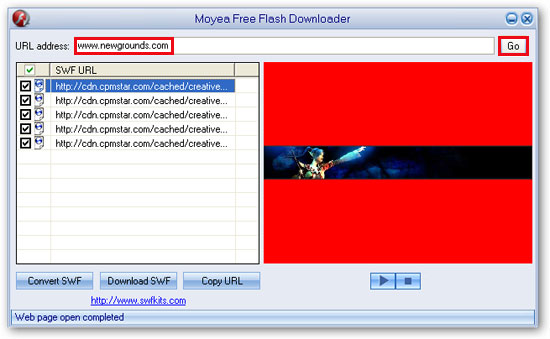


Step 2: Click the file name to have a preview on the right panel and then click “Download SWF”.

1. Choose “Select download folder” to select a destination folder for those downloaded SWF files.
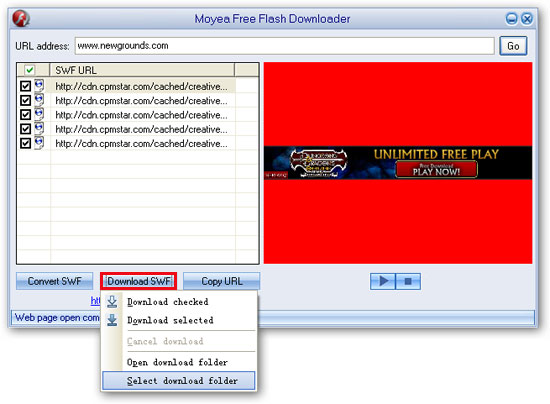


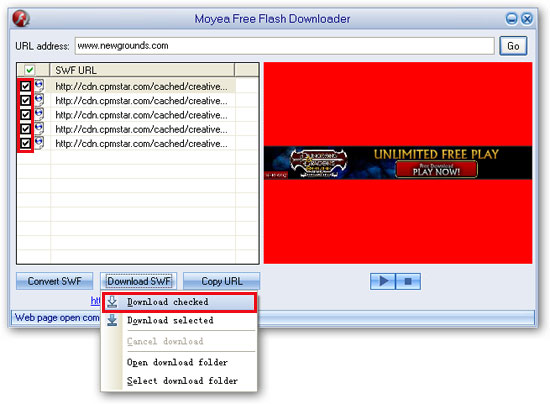
2. Choose “Download checked” to download all the checked SWF files.


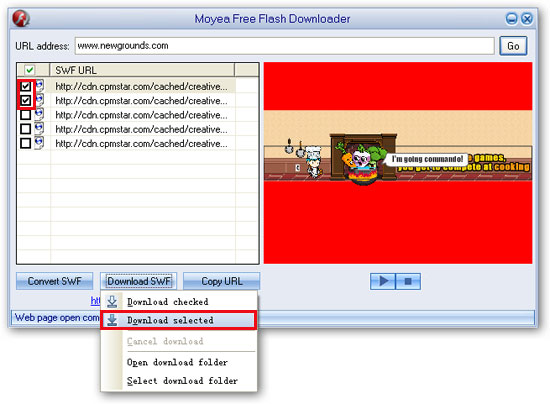
3. Choose “Download selected” to download the selected SWF file.


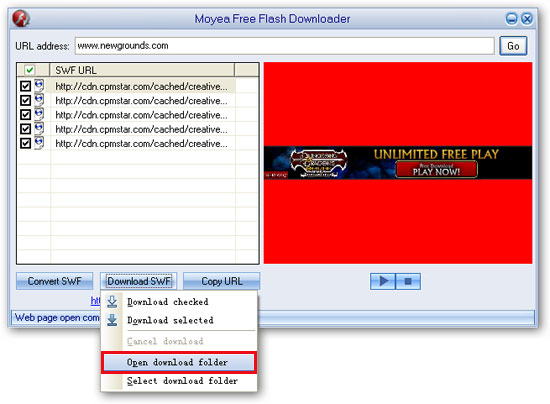
4.When the downloading is finished, click “Open download folder” to view the downloaded SWF files in the destination folder.


Part 2

Besides the above-mentioned method, there is also another way to download SWF files with Moyea SWF to Video Converter Pro, here is how:

Step 1: Click “Browse” and then choose “From IE cache” from the drop-down menu.
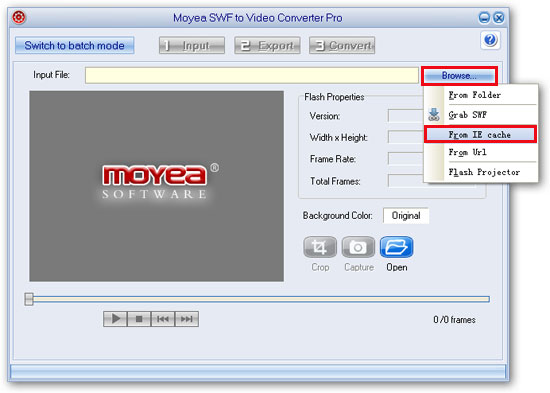


Step 2: In the pop-up window, you will see all the saved SWF files from all the websites you have browsed in your IE cache. Click the file name to have a preview and right click to go to the default temporary folder then save it to your appointed folder.

Convert SWF to MP4 for iPhone

What is SWF?

The SWF file format (pronounced "swiff") delivers vector graphics, text, video, and sound over the Internet to AdobeFlashPlayer software. The SWF file format is designed to be an efficient delivery format, not a format for exchanging graphics between graphics editors. It is designed to meet the goals of On-screen display, Extensibility, Network delivery, Simplicity, Scriptability, Speed, Scalability.

What is iPhone?

iPhone is extremely thin (only 11.6 millimeters thick) but wider and longer than many comparable devices. The display area is a 3.5-inch wide screen multi-touch interface with unusually high resolution (160 pixels per inch). Unlike most other smartphones, iPhone does not use a hardware keyboard or a stylus. To navigate, a user uses multiple taps and drags to navigate through a mobile version of Apple's OS X operating system. Like iPod, iPhone synchronizes data with a user's personal computer, using iTunes as client software and Apple's proprietary USB port. iPhone is compatible with Microsoft's Windows operating systems, including Vista.

iPhone's networking features include:

* Automatic detection of WiFi networks.
* Support for the 802.11b and 8.2.11g standards.
* The use of quadband GSM and SIM Cards to access cellular networks.
* EDGE support for high-speed data transfer where available.
* Bluetooth connectivity for short range networking with peripherals, other iPhones and PCs.

For the reason of features of SWF file and iPhone Player, and if you want to view SWF file with your iPhone player, you have to use some SWF Converter to convert SWF to MP4 which is compatible with iPhone. Therefore, Moyea SWF to Video Converter is the best choice.

Besides Moyea SWF to Video Converter Pro and Standard version, Moyea SWF to iPhone Converteris also an economical and powerful tool for converting SWF to video for home use as well as sharing with excellent picture quality and sound quality.

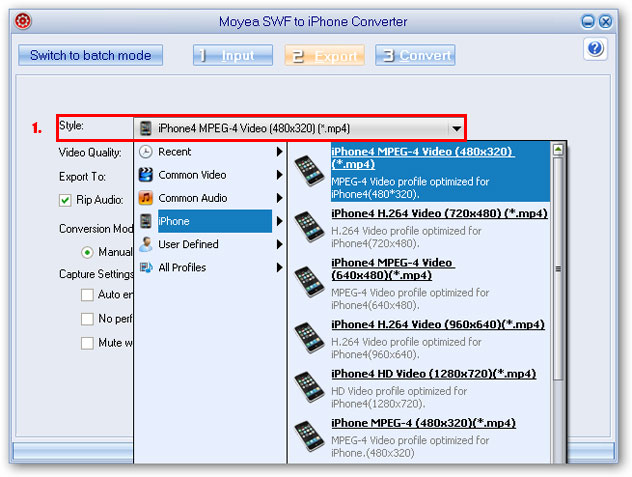
1. This SWF to iPhone Converter can convert swf to mp4, swf to iphone video(mp4), swf to iPod video(mp4 for home and amateur users, for this iPhone Converter cost less and has perfect performancesfor conversion.Besides, this flash (SWF) to iPhone Converter offersthe mostsuitable profile for the output, as well as reset some parameters for the output.


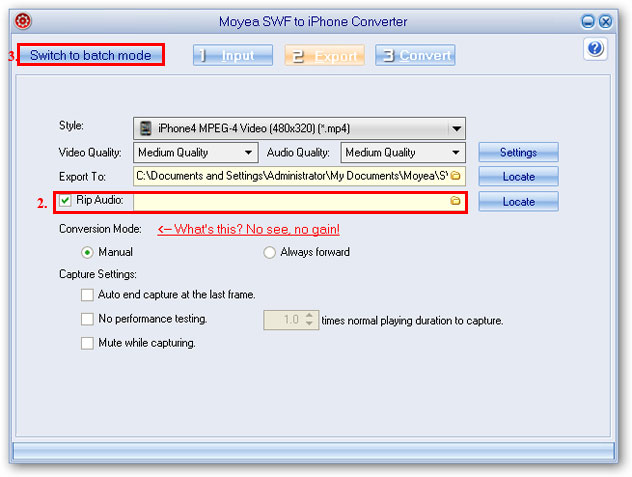
2. Moyea SWF to iPhone Converter can rip SWF to MP3, AAC, M4A, WAV, WMA audio files for your other entertainment use. You only need to make sure that "Rip Audio" is checked, and then specify a folder to locate the audio file. After conversion, you will find the audio file the located folder.

3. Support batch mode conversion. If you are in the single mode, you only need to click "Switch to batch mode" to turn to batch mode. With batch mode, you can convert multiple file at a time without manual interference.


Moyea SWF to iPhone Converter also allows interaction with Flash content during the conversion and there are no frame skips in the generated videos. Besides, its Play-and-capture technology allows users to decide the beginning frame and end frame to capture for conversion to meet their needs.