Showing posts with label mp4. Show all posts

Convert DVD to MP4 with H.264?

MP4 is widely supported by a range of portable media players, like MP4 Player, iPod, iPhone, cell phones, etc. MP4 is more suitable to put on the web compared to other format with a Flash player. Convert DVD to MP4 with H.264 or is a high Google inquiry for converting DVD to MP4 for video playing on portable media players. Leawo DVD to FLV Converter is to convert DVD to Flash videos, including MOV, FLV, MP4 with H.264. This DVD to MP4 converter may cater for your need, as it can not only process the single Chapters, but Titles and Video_TS! Moreover, this DVD to MP4 converter offers you powerful video edit functions, like video trimming and cropping. In this sense, it is not simply a DVD to MP4 Converter, but a video trimmer and cropper.

Easy steps to convert DVD to MP4 with H.264:

Step 1
Insert the DVD disk into the DVD drive, open the program and import the DVD files.


Step 2
Do the settings:
1. In Subtitle, select the subtitle language.
2. In Audio, select the language of the audio.
3. In Profile, select MP4 Video Support Flash Player.
4. In Output, set your destination folder for the output file.

Step 3
Click "Customize" to customize the video in your desire.
In settings: Check to make sure the video codec is H.264. If it is not the H.264, then click the drop down and select the H.264 video codec.


a. Effect adjustment:
Drag the slides for Brightness, Contrast, and Volume to improve the video quality.
b. Drag the buttons on the slide to trim the video or change the values directly in the Start Time and End Time.
c. Choose a selection from "Letter Box" to crop the video, or directly drag the dot frame for it. Click "OK" to confirm the settings.

Step 4
Click the big button to start the conversion.

Convert SWF to MP4 for iPhone

What is SWF?

The SWF file format (pronounced "swiff") delivers vector graphics, text, video, and sound over the Internet to AdobeFlashPlayer software. The SWF file format is designed to be an efficient delivery format, not a format for exchanging graphics between graphics editors. It is designed to meet the goals of On-screen display, Extensibility, Network delivery, Simplicity, Scriptability, Speed, Scalability.

What is iPhone?

iPhone is extremely thin (only 11.6 millimeters thick) but wider and longer than many comparable devices. The display area is a 3.5-inch wide screen multi-touch interface with unusually high resolution (160 pixels per inch). Unlike most other smartphones, iPhone does not use a hardware keyboard or a stylus. To navigate, a user uses multiple taps and drags to navigate through a mobile version of Apple's OS X operating system. Like iPod, iPhone synchronizes data with a user's personal computer, using iTunes as client software and Apple's proprietary USB port. iPhone is compatible with Microsoft's Windows operating systems, including Vista.

iPhone's networking features include:

* Automatic detection of WiFi networks.
* Support for the 802.11b and 8.2.11g standards.
* The use of quadband GSM and SIM Cards to access cellular networks.
* EDGE support for high-speed data transfer where available.
* Bluetooth connectivity for short range networking with peripherals, other iPhones and PCs.

For the reason of features of SWF file and iPhone Player, and if you want to view SWF file with your iPhone player, you have to use some SWF Converter to convert SWF to MP4 which is compatible with iPhone. Therefore, Moyea SWF to Video Converter is the best choice.

Besides Moyea SWF to Video Converter Pro and Standard version, Moyea SWF to iPhone Converteris also an economical and powerful tool for converting SWF to video for home use as well as sharing with excellent picture quality and sound quality.

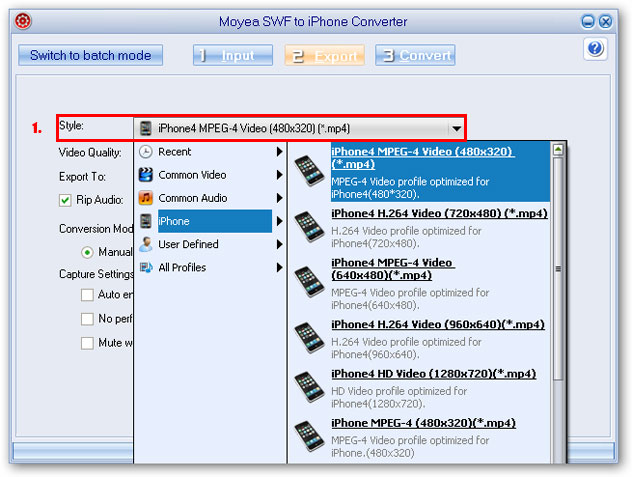
1. This SWF to iPhone Converter can convert swf to mp4, swf to iphone video(mp4), swf to iPod video(mp4 for home and amateur users, for this iPhone Converter cost less and has perfect performancesfor conversion.Besides, this flash (SWF) to iPhone Converter offersthe mostsuitable profile for the output, as well as reset some parameters for the output.


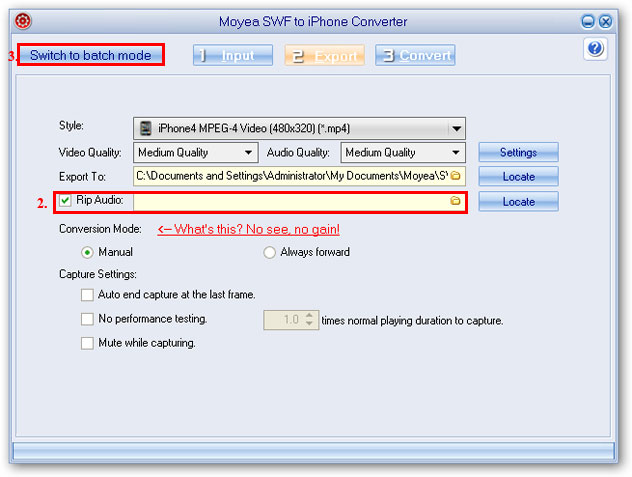
2. Moyea SWF to iPhone Converter can rip SWF to MP3, AAC, M4A, WAV, WMA audio files for your other entertainment use. You only need to make sure that "Rip Audio" is checked, and then specify a folder to locate the audio file. After conversion, you will find the audio file the located folder.

3. Support batch mode conversion. If you are in the single mode, you only need to click "Switch to batch mode" to turn to batch mode. With batch mode, you can convert multiple file at a time without manual interference.


Moyea SWF to iPhone Converter also allows interaction with Flash content during the conversion and there are no frame skips in the generated videos. Besides, its Play-and-capture technology allows users to decide the beginning frame and end frame to capture for conversion to meet their needs.